What is social media automation? Save time and boost results
Discover what social media automation is and how it saves time while boosting your results. Streamline your strategy today!

Posting manually to six different platforms every day is a fast track to burnout. You write the caption, resize the image, log into each account, post, and then do it all over again tomorrow. For social media managers juggling multiple clients, or small business owners wearing every hat, that routine eats hours that could go toward actual strategy. Social media automation changes that equation entirely, letting software handle the repetitive work while you focus on what actually moves the needle.
Table of Contents
- What is social media automation?
- Core benefits of automating social media tasks
- Popular automation tools: Features and comparison
- Risks and best practices for safe automation
- Simple steps to start automating your social media
- Why smart automation beats shortcuts every time
- Ready to automate? Try tools built for you
- Frequently asked questions
Key Takeaways
| Point | Details |
|---|---|
| Automation saves hours | Scheduling and posting tools free up time for more strategic work. |
| Use endorsed tools | Choose officially supported software to minimize risk of bans and lost reach. |
| Balance with authenticity | Combine automation with a human touch to keep your audience engaged. |
| Start simple, scale smart | Begin with basic scheduling features and layer in analytics as you grow. |
What is social media automation?
Social media automation means using software to handle the mechanical side of your social media presence: scheduling posts, publishing content across platforms, recycling evergreen material, and pulling analytics. Instead of manually logging into TikTok, Instagram, Facebook, YouTube, X, and LinkedIn one by one, you set everything up in a single dashboard and let the tool do the heavy lifting.
A common misconception is that automation means handing your brand voice over to a robot. That’s not accurate. At its core, automation covers:
- Scheduling: Write your posts in advance and set exact publish times
- Cross-platform publishing: Send one piece of content to multiple networks simultaneously
- Content recycling: Automatically repost high-performing older content on a set rotation
- Analytics collection: Pull performance data without manually checking each platform
- Workflow triggers: Connect tools like Zapier or Make.com to automate actions based on conditions
AI-powered content generation is a newer layer on top of these basics. It can help you scale output, but as AI-driven automation can risk inauthenticity or account issues when misused, it requires careful oversight. The foundational tools, the ones focused purely on scheduling and distribution, are where most businesses start and where the biggest time savings live.
It’s also worth noting that automation isn’t reserved for enterprise brands with large marketing teams. A local bakery scheduling its weekly specials on Monday morning gets the same efficiency gains as a national retailer. If you want to schedule posts for maximum reach without spending your evenings glued to a screen, automation is the practical answer. Understanding the difference between manual vs automated posting workflows is the first step toward building a smarter system.
Core benefits of automating social media tasks
With a clear understanding of what social media automation is, it’s time to look at why it’s become essential for modern teams and business owners.
The advantages stack up quickly once you start using the right tools:
- Time savings: Scheduling saves hours compared to manual daily posting. Batching a full week of content into one focused session is dramatically more efficient than interrupting your workflow six times a day.
- Multi-platform reach without the friction: When you streamline multi-platform posting, you stop losing time to repetitive logins and platform-specific formatting adjustments.
- Consistent brand presence: Automation keeps your posting schedule intact even during vacations, busy seasons, or unexpected disruptions. Consistency is one of the strongest signals to both algorithms and audiences.
- Better analytics: Automated tools aggregate data across platforms so you can see what’s working without building manual spreadsheets. This makes it far easier to optimize posting for engagement over time.
- Reduced account risk: Endorsed automation tools operate within platform guidelines, unlike unauthorized bots that can trigger restrictions or bans.
To get even more out of your strategy, pairing automation with solid content planning pays off. Resources like these engagement strategy tips can help you build a content mix that performs well once it’s scheduled.
Pro Tip: Use your automation platform’s built-in analytics to identify your top three performing post types and time slots. Then build your next content calendar around those patterns rather than guessing.
Popular automation tools: Features and comparison
Understanding the benefits is only helpful if you can pick the right tools. Here’s how features stack up between the most popular options.
Not all automation platforms are created equal. Some focus purely on scheduling, while others layer in AI writing assistants, CRM integrations, or deep analytics. The key distinction that matters most for account safety: platforms favor officially endorsed tools, not workarounds or third-party bots that bypass API rules.

Here’s a practical comparison of common features across tool categories:
| Feature | Basic schedulers | Mid-tier platforms | All-in-one platforms |
|---|---|---|---|
| Post scheduling | ✓ | ✓ | ✓ |
| Multi-platform publishing | Limited | ✓ | ✓ |
| Analytics dashboard | Basic | Moderate | Advanced |
| AI content suggestions | ✗ | Sometimes | ✓ |
| API/Zapier integrations | ✗ | Limited | ✓ |
| Platform-endorsed access | Varies | Usually | ✓ |
| Media library | ✗ | ✓ | ✓ |
| Team collaboration | ✗ | Limited | ✓ |
When evaluating tools, prioritize those that connect to platforms through official APIs. This protects your accounts and ensures your content actually gets published without triggering spam filters. Reviewing best content publishing practices alongside your tool selection will help you get the most out of whichever platform you choose.
Format matters too. Different platforms reward different content types, so choosing a tool that gives you control over platform-specific settings is a real advantage. Exploring engagement-driven social formats can help you decide what content to prioritize in your scheduling queue.
Pro Tip: Before committing to any tool, check whether it has official developer partnerships with the platforms you use most. That single factor separates safe, effective automation from risky workarounds.
Risks and best practices for safe automation
With tool selection covered, staying safe and successful in automation requires awareness of possible downsides and how to sidestep them.
Automation done poorly can hurt your brand more than help it. The biggest risks fall into two categories: technical and relational.
On the technical side, AI-driven automation risks inauthenticity or bans when it operates outside platform rules. Unauthorized bots that simulate human behavior, scrape data, or post at inhuman speeds get caught. Platforms are sophisticated, and they actively work to detect and penalize evasion tactics.
On the relational side, over-automation strips the personality out of your brand. If every post feels templated and no one ever responds to comments in real time, your audience notices. Engagement drops. Trust erodes.
Here are the core best practices for keeping automation working in your favor:
- Use only officially endorsed tools that connect through platform APIs
- Mix live posts with scheduled ones to maintain spontaneity and relevance
- Respond to comments manually rather than relying on automated replies for sensitive conversations
- Audit your content calendar regularly to remove outdated or off-brand posts
- Monitor analytics for anomalies such as sudden drops in reach or engagement, which can signal a platform issue
- Keep AI-generated content in check by editing for tone, accuracy, and brand voice before scheduling
“Balance the convenience of automation with the authenticity your audience expects.”
Understanding the right manual vs automated workflows for your specific situation is critical. Some moments call for a real human voice, and no tool should replace that. Pair your automation strategy with platform-specific strategies so your content fits the culture of each network rather than feeling copy-pasted.
Video content in particular benefits from a thoughtful approach. A strong video strategy for engagement combined with smart scheduling gives you reach without sacrificing quality.
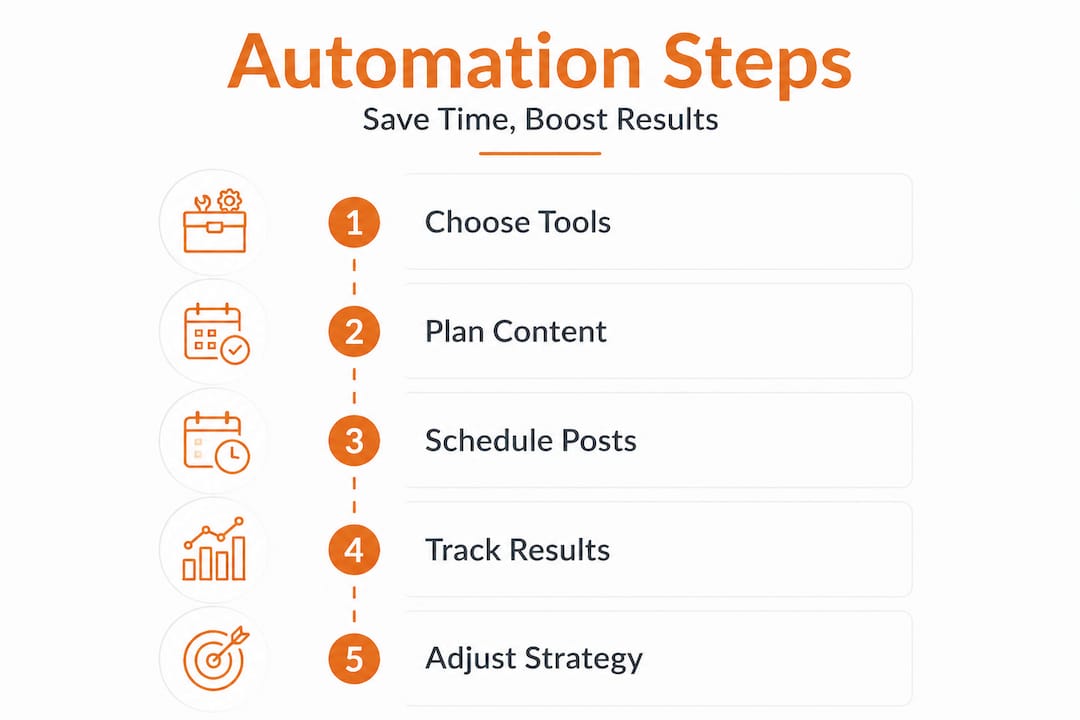
Simple steps to start automating your social media
Equipped with strategies for success, let’s move from theory to action. Here are clear steps to start automating like a pro.
Getting started doesn’t require a massive overhaul of your current workflow. You can phase automation in gradually and scale as you get comfortable.
- Audit your current workflow: Track how long you spend on posting tasks each week. This baseline helps you measure the time savings once automation is running.
- Choose an endorsed tool: Select a platform that officially connects to all the networks you use. Verify it has API-level access, not browser-based workarounds.
- Link your accounts securely: Use OAuth connections (the standard secure login method) to authorize the tool without sharing your passwords.
- Build a content calendar: Plan at least two weeks of content in advance. Include a mix of formats: images, videos, text posts, and links.
- Set your posting schedule: Use your analytics to identify peak engagement windows, then schedule posts around those times. A guide to automating post times can help you dial this in precisely.
- Activate analytics tracking: Make sure your tool is collecting data from day one so you have performance benchmarks to work from.
- Review and adjust weekly: Spend 15 minutes each week checking what performed well and refining the next batch of content accordingly.
Basic scheduling tools focus on efficiency, and that efficiency compounds over time. Here’s a realistic look at what that time savings looks like in practice:
| Task | Manual time per week | Automated time per week | Time saved |
|---|---|---|---|
| Writing and posting to 4 platforms | 5 hours | 1.5 hours | 3.5 hours |
| Pulling analytics from each platform | 2 hours | 15 minutes | 1.75 hours |
| Reformatting content per platform | 1.5 hours | 20 minutes | 1.2 hours |
| Monitoring post performance | 1 hour | 20 minutes | 40 minutes |
| Total | 9.5 hours | 2.5 hours | 7 hours |
Seven hours back in your week is not a small gain. That’s time you can redirect toward content strategy, community building, client work, or simply not working weekends. Tools that help you maximize multi-platform engagement with scheduling make this kind of efficiency achievable without a large team.
If you work in e-commerce or manage video-heavy content, learning how to plan social video workflows alongside your automation setup will multiply your results even further.
Why smart automation beats shortcuts every time
Here’s a perspective that doesn’t get enough attention: the brands chasing the latest AI automation hacks are often the ones getting burned, while the brands using straightforward, endorsed tools with human oversight quietly build lasting audiences.
The appeal of shortcuts is understandable. If a tool promises to auto-generate 30 posts, publish them across every platform, and respond to every comment without any human input, that sounds like a dream. But platforms win against evasion tactics and consistently favor endorsed tools over workarounds. The accounts that rely on shortcuts face algorithm suppression, restricted reach, or outright bans. And once you lose account standing, rebuilding it takes far longer than the time you saved.
The smarter play is boring by comparison, but it works. Pick tools with official platform partnerships. Schedule your content thoughtfully. Show up in the comments yourself a few times a week. Let automation handle the distribution while you handle the relationship-building.
This balance is what separates brands that grow sustainably from those that spike and crash. The goal of balancing manual and automated posting isn’t to minimize human involvement as much as possible. It’s to eliminate the low-value repetitive tasks so your human time goes toward high-value interactions.
Pro Tip: Treat automation as a time-saver, not a replacement for human interaction. The brands that win long-term are the ones that feel genuinely present, even when most of their content is scheduled.
Ready to automate? Try tools built for you
If you’ve been manually posting to multiple platforms and feeling the grind, there’s a better way to work.

Status 200 Uploads is built specifically for social media managers and small business owners who need reliable, endorsed multi-platform automation without the complexity. Connect your TikTok, Instagram, Facebook, YouTube, X, and LinkedIn accounts through a single secure dashboard. Schedule content, manage your media library, track post performance, and integrate with Zapier or Make.com for advanced workflow automation. It’s designed to give you back those seven-plus hours a week while keeping your accounts safe and your brand consistent. If you’re weighing your options, you can also compare Status 200 Uploads and Publer side by side to see which fits your workflow best.
Frequently asked questions
What tasks can be automated on social media?
Automation tools handle scheduling, publishing, analytics, content recycling, and in some cases moderation or basic responses. The core time-savers are scheduling and cross-platform distribution.
Are there risks to using social media automation?
Yes. AI-driven automation risks include account restrictions, bans, or a loss of authentic brand voice. Using officially endorsed tools and mixing automated posts with live engagement keeps those risks low.
Is social media automation allowed by all platforms?
Platforms favor officially endorsed tools that use approved APIs. Unauthorized bots or tools that bypass platform rules can result in account suspension or content suppression.
Can small businesses benefit from automation or is it only for large brands?
Small businesses benefit just as much as large brands, often more so, since they typically have fewer people to handle posting tasks. Automation gives small teams the output of a much larger operation.
Recommended
- Status 200 Uploads — Schedule Posts to TikTok, Instagram, FB, YouTube, X & LinkedIn
- Status 200 Uploads — Schedule Posts to All Socials
- Status 200 Uploads — Schedule Posts to All Socials
- Status 200 Uploads — Schedule Posts to All Socials
- How to plan social video workflows for e-commerce success
- Automating Video Editing: Transforming Production Efficiency